

Laptop Screen Replacement Cost 2026: What to Expect

Table of Contents
Average Cost of Laptop Screen Replacement
Factors Influencing Laptop Screen Replacement Cost Screen Technology: LCD, LED, and Touchscreen Pricing Laptop Brand and Model Impact OEM vs. Aftermarket Screen Parts
Screen Technology: LCD, LED, and Touchscreen Pricing
Laptop Brand and Model Impact
OEM vs. Aftermarket Screen Parts
Laptop Screen Repair vs Replacement: Which Makes Sense When Repair Is Still an Option When Replacement Is Your Only Choice
When Repair Is Still an Option
When Replacement Is Your Only Choice
Cost Breakdown: Parts vs. Labor Fees
DIY Laptop Screen Replacement Guide: Save on Labor Tools and Parts You'll Need Step-by-Step Replacement Process Common Mistakes to Avoid
Tools and Parts You'll Need
Step-by-Step Replacement Process
Common Mistakes to Avoid
Laptop Screen Repair Time: Professional Turnaround
Is It Worth Repairing or Buying New? Cost-Benefit Analysis Framework Warranty and Insurance Coverage Options
Cost-Benefit Analysis Framework
Warranty and Insurance Coverage Options
Get a Professional Quote From PhoneProbs
Last Updated: August 5, 2026
Average Cost of Laptop Screen Replacement
The cost of replacing a laptop screen in 2026 typically ranges widely depending on whether you choose OEM parts, aftermarket alternatives, or attempt a DIY approach. Professional repair costs vary significantly based on parts, labor fees, and diagnostic time. PhoneProbs stands out in the local Scottsboro market by providing quick repair quotes without hidden fees, so you know exactly what you're paying before work begins.
Pro Tip Before getting a quote anywhere, identify your laptop's exact model number (usually on the bottom or in system settings). This single detail can save you hundreds, the difference between a standard LCD and a touchscreen assembly is substantial, and shops need this information for accurate pricing.
Factors Influencing Laptop Screen Replacement Cost
Several interconnected factors determine what you'll actually pay for a laptop screen replacement.
Screen Technology: LCD, LED, and Touchscreen Pricing
The type of display panel dramatically affects your total cost. A standard LCD panel with LED backlight is the most affordable option, while touchscreen assemblies and high-resolution OLED displays command premium prices. Touchscreen displays add complexity because the digitizer layer must be integrated with the LCD panel, requiring precision work.
OLED panels, found in premium laptops, represent the highest expense category. These panels deliver superior contrast and color accuracy but are fragile and expensive to source.
Laptop Brand and Model Impact
Dell, HP, Lenovo, ASUS, and Apple each have distinct supply chains. Apple MacBook screens tend to be more expensive than equivalent-sized screens for Windows laptops, reflecting proprietary design and limited aftermarket availability.
Enterprise laptop models often have better parts availability and lower replacement costs than gaming laptops. Gaming laptops with high-refresh-rate displays (144Hz or higher) use specialized panels that cost more to replace than standard 60Hz screens.
Older laptop models present a different challenge: parts may be harder to source, requiring longer lead times that increase labor costs.
OEM vs. Aftermarket Screen Parts
Original Equipment Manufacturer (OEM) screens are genuine parts from the laptop's original manufacturer and typically come with warranty coverage. OEM parts cost more upfront but offer reliability and compatibility assurance.
Aftermarket screens are third-party replacements that fit your laptop model but come from different manufacturers. They're significantly cheaper than OEM parts, though quality varies. For a three-year-old laptop you plan to use for another two years, an aftermarket screen makes financial sense. For a newer device you'll keep longer, OEM parts justify the higher upfront cost.
Laptop Screen Repair vs Replacement: Which Makes Sense
Not every damaged screen requires full replacement.
When Repair Is Still an Option
Minor physical damage like small cracks that don't affect the display or light scratches on the bezel sometimes doesn't require replacement. If your screen still displays images clearly and the damage is purely cosmetic, you might defer replacement indefinitely.
Flickering or brightness issues occasionally stem from loose ribbon cables connecting the display to the motherboard, not the panel itself. A technician can reseat these connections in minutes, costing far less than full replacement.
When Replacement Is Your Only Choice
Water damage affecting the LCD panel itself requires replacement, there's no repair for internal panel damage. Extensive cracking that spans a large area makes repair impractical.
If your laptop is still under warranty or covered by accidental damage insurance, replacement might be free or heavily subsidized.
Watch Out Continuing to use a severely cracked screen risks spreading the damage to the ribbon cable or motherboard connection. The longer you wait, the higher the risk of secondary damage that increases total repair costs.
Cost Breakdown: Parts vs. Labor Fees
Understanding what you're paying for helps you evaluate quotes and identify overpricing.
Parts cost depends entirely on the screen type and source. A standard aftermarket LCD panel costs less than an OEM touchscreen assembly for a premium laptop. Parts procurement also adds time, if a shop doesn't stock your specific panel, they must order it, extending turnaround and potentially adding shipping fees.

Labor fees reflect the technician's time, expertise, and warranty commitment. A straightforward screen replacement on a standard laptop might take 30-45 minutes for an experienced technician. More complex jobs, like disassembling gaming laptops or working on ultrabooks with intricate designs, take longer and cost more.
Diagnostic fees sometimes apply upfront, typically ranging from modest amounts and sometimes credited toward repair costs if you proceed. Independent shops often skip diagnostic fees for straightforward cases, charging only for actual work performed.
Some shops quote labor as an hourly rate, while others use flat rates for common repairs. Always clarify whether the quoted price includes parts, labor, diagnostics, and warranty coverage.
Key Takeaway The total cost is parts plus labor plus any applicable fees. A cheap parts quote combined with high labor costs might exceed a premium parts quote with lower labor. Always request a complete breakdown before authorizing work.
DIY Laptop Screen Replacement Guide: Save on Labor
Replacing a laptop screen yourself eliminates labor costs entirely, but requires technical confidence and careful execution.
Tools and Parts You'll Need
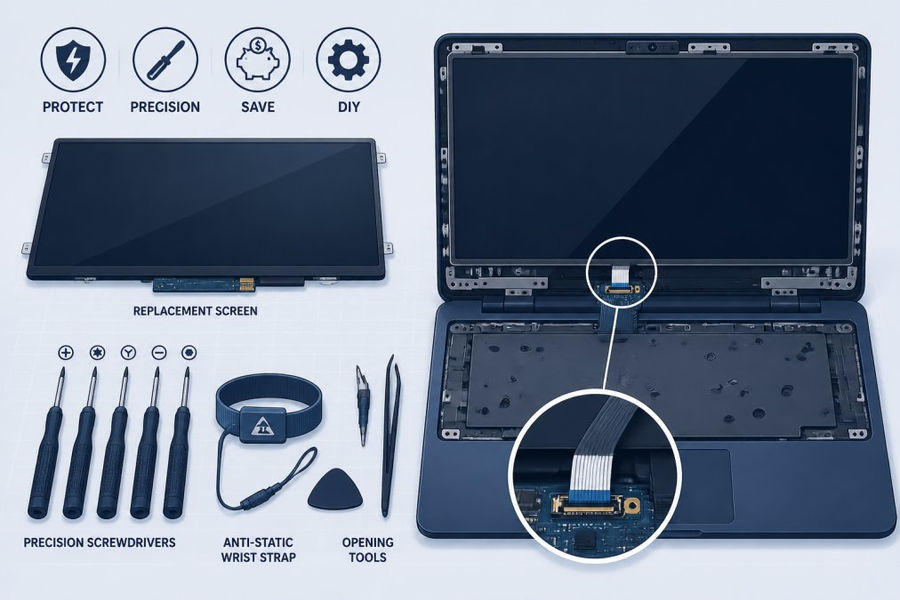
You'll need the replacement screen (sourced from iFixit, Parts-People.com, or similar vendors). Gather a small Phillips screwdriver, a plastic spudger or pry tool to safely separate bezels, and an anti-static wrist strap to prevent electrical discharge damage.
Some replacements require removing the keyboard or palm rest first, which might need additional tools like a torx screwdriver. Consult your specific laptop's repair guide before starting, iFixit maintains detailed guides for most popular models with step-by-step photos.
Have a clean, well-lit workspace ready. A soft cloth protects your work surface and the laptop. Keep all screws organized in a small container, since laptops often use different screw lengths in different locations.
Step-by-Step Replacement Process
Start by powering off your laptop completely and disconnecting the battery if possible. Let the device cool for several minutes. Locate the bezel and carefully pry it away from the display using your plastic tool. Work slowly around the edges; bezels are often held by clips that break easily if forced.
Once the bezel is free, remove the mounting bracket screws (usually 2-4 per side). Gently lift the screen away, being careful not to stress the ribbon cable connecting it to the motherboard.
The ribbon cable typically slides into a connector on the motherboard. Locate the small latch holding the cable in place, gently lift it, and slide the ribbon out. This is the most delicate part, ribbon cables break easily if bent sharply or pulled at an angle.
Reverse the process with your new screen: insert the ribbon cable, press the latch down to secure it, position the new panel in the mounting brackets, install the screws, and snap the bezel back into place. Power on and test the display.
Common Mistakes to Avoid
Forcing the bezel is the most frequent error. Work slowly and methodically around the entire perimeter, gently separating the bezel a little at a time.
Bending the ribbon cable at sharp angles damages the delicate traces inside. Always support the cable and slide it straight into and out of connectors.
Forgetting to disconnect the battery before starting creates risk of electrical shorts. A few seconds to disconnect the battery prevents costly mistakes.
Overtightening mounting screws cracks the plastic brackets or the panel itself. Screw them snug, but stop as soon as you feel resistance.
Laptop Screen Repair Time: Professional Turnaround
Turnaround time varies based on parts availability and shop workload.
Same-day service is possible when shops stock your specific screen in inventory. Local shops often maintain stock of common screens, reducing wait time compared to national chains that order parts to a central warehouse.
If your screen isn't in stock, the shop must order it. Standard shipping typically adds 3-7 business days. Expedited shipping accelerates this but adds cost.
Professional repair shops typically complete standard screen replacements within 24-48 hours when parts are available.
Is It Worth Repairing or Buying New?
This decision hinges on your laptop's age, remaining useful life, and the total repair cost relative to replacement options.
Cost-Benefit Analysis Framework
Calculate the repair cost as a percentage of your laptop's current value. If repair costs exceed 50% of what you'd pay for a comparable used replacement, buying new often makes more financial sense.
Consider how long you plan to keep the laptop. If you'll use it for another 2-3 years, repair becomes more justifiable. If you were already planning to upgrade within 6 months, that changes the calculation entirely.
Evaluate the laptop's condition beyond the screen. If it's showing signs of age, battery degradation, or keyboard issues, a screen replacement might not be worthwhile.
Warranty and Insurance Coverage Options
Check whether your laptop is still under manufacturer warranty or covered by accidental damage insurance. Many employer-provided laptops include coverage that makes repairs free or heavily subsidized.
If your device is out of warranty and uninsured, you're paying full repair costs out of pocket. Some manufacturers offer extended warranty or accidental damage plans that cover screen replacement for a fixed fee.
Get a Professional Quote From PhoneProbs
Making the right repair decision requires accurate information about your specific situation. PhoneProbs offers quick repair quotes for laptop screen replacement cost assessment without any pressure or hidden fees. Their team specializes in water damage repair and comprehensive tech support for phones, consoles, computers, and laptops.
Whether you're dealing with a cracked display, flickering issues, or water damage affecting your screen, PhoneProbs provides professional assistance with transparent pricing. They handle buy, sell, trade, and repair services, giving you options beyond just fixing your current device. For Scottsboro residents needing urgent laptop repair, their quick turnaround and local availability eliminate the frustration of shipping devices away.
Stop by PhoneProbs today for a professional quote. BOOK YOUR REPAIR and get your laptop back in working order quickly, with the confidence that comes from working with experienced technicians who understand your device inside and out.
The decision between repairing and replacing your laptop ultimately depends on your specific device, budget, and timeline. A professional assessment from PhoneProbs cuts through the guesswork. Their team can evaluate whether your screen damage warrants replacement or if a simpler repair addresses your issue, potentially saving you hundreds of dollars. Visit today to get started.
Frequently Asked Questions
How much does a typical laptop screen replacement cost in 2026?
Laptop screen replacement costs vary widely based on your device model, screen technology, and whether you choose professional service or DIY. Professional laptop screen replacement costs typically range from $100 to $500 or more, depending on whether you have an LCD panel, LED backlight, or touchscreen assembly. For specific pricing on your model, contact PhoneProbs for a free repair quote, we'll assess your laptop and provide transparent pricing upfront.
What factors influence the total cost of laptop screen repair vs replacement?
Several factors affect laptop screen replacement cost: the laptop brand and model (MacBooks and premium brands cost more), screen technology (touchscreen assemblies cost more than standard LCD panels), whether you use OEM or aftermarket parts, labor fees at your service center, diagnostic fees, and shipping costs if using mail-in service. PhoneProbs evaluates all these factors during your free diagnostic to give you an accurate estimate.
How long does professional laptop screen repair time typically take?
Professional laptop screen repair time depends on your service provider and workload. Many shops like uBreakiFix complete same-day repairs for common laptop models. Mail-in services like Screen Surgeons take 3-7 business days plus shipping time. PhoneProbs provides quick repair quotes and can discuss turnaround time based on your specific laptop model and current repair queue, call or visit for your fastest option.
Can I save money with a DIY laptop screen replacement guide?
Yes, DIY laptop screen replacement can save you $100-$300 in labor fees. You'll need the correct replacement screen, basic tools (screwdrivers, anti-static wrist strap), and detailed instructions. However, DIY carries risks: you might damage the ribbon cable, bezel, or motherboard connection if you lack technical expertise. Sites like iFixit provide free guides and sell quality replacement parts. If you're unsure, professional repair ensures warranty coverage and correct installation.
Is it worth fixing a cracked laptop screen or should I buy a new laptop?
Repair makes sense if your laptop is less than 3-4 years old and otherwise functions well. A screen replacement costs significantly less than a new laptop. However, if your device has multiple hardware failures, an older model, or the repair cost exceeds 40-50% of a new budget laptop's price, replacement may be smarter. Consider your laptop's age, remaining lifespan, and whether the device still meets your needs for work or school.
BOOK YOUR REPAIR
This article was written using GrandRanker
Comments