

DIY Phone Repair vs Professional Service: Pros and Cons

Table of Contents
DIY Phone Repair vs Professional Service: The Core Trade-Off
DIY Phone Repair Risks: What Can Go Wrong When You Fix It Yourself
Common DIY Mistakes That Turn a $30 Fix Into a $300 Problem
Professional Phone Repair Cost: What You Actually Pay For
Labor, Parts, and the Hidden Costs Nobody Mentions
Phone Repair Tools and Parts: What DIY Actually Requires
How to Choose a Phone Repair Shop You Can Trust
Warranty, Water Resistance, and Parts Pairing: What DIY Void
Conclusion: Matching the Repair Method to Your Device and Situation
Frequently Asked Questions
Last Updated: October 12, 2026
DIY Phone Repair vs Professional Service: The Core Trade-Off
DIY phone repair vs professional service pros and cons comes down to one honest question: is the money you save worth the risk you take? DIY phone repair is fixing your own device using a repair kit and online guides, while professional phone repair is paying a trained technician to diagnose and fix it for you.
The appeal of DIY is obvious. Replacement parts and a repair kit often cost less than a shop visit, and you skip the wait. The catch is that a botched repair can turn a simple screen replacement into a dead phone. That gap between upfront cost and total cost is where most people get it wrong.
DIY Phone Repair Risks: What Can Go Wrong When You Fix It Yourself
The biggest DIY phone repair risk isn't a scratched screen. It's permanent hardware damage. Modern phones pack fragile internal components into a tight frame, and one wrong move can break a connector, tear a flex cable, or crack the display you just installed.
Common trouble spots include:
Prying too hard and cracking the screen or bending the frame
Puncturing the lithium-ion battery, which can cause a short circuit or fire
Ripping display and charging port flex cables during disassembly
Losing tiny screws or reinstalling them in the wrong spots
Water damage raises the stakes further. Corrosion spreads fast, and a device that powers on after a DIY dry-out can fail weeks later.
Watch Out Never pry near a swollen or punctured lithium-ion battery. A damaged battery can vent or catch fire. If you smell a sweet chemical odor or see swelling, stop and bring the device to a professional.
Common DIY Mistakes That Turn a $30 Fix Into a $300 Problem
The most expensive DIY mistakes are the ones that cause additional damage. A cheap replacement part that doesn't fit can crack a new screen. Forcing a charging port ribbon can kill the charging circuit entirely. And skipping a proper diagnosis means you might replace the wrong component.
What most guides miss is that a failed repair rarely stays a single problem. One broken connector often cascades into two or three. That's how a budget fix becomes a full board-level repair.
Professional Phone Repair Cost: What You Actually Pay For
Professional phone repair cost covers far more than the part. You're paying for the technician's diagnosis, labor, quality replacement parts, and a repair guarantee. The upfront cost is higher, but the total cost is usually predictable.
Here's what that money buys:
Accurate diagnosis before any part is ordered
Quality replacement parts that fit and last
Skilled labor that protects internal components
A warranty if something fails after the repair
Labor, Parts, and the Hidden Costs Nobody Mentions
The hidden costs of DIY show up after the fact. A failed repair means buying a second part, or paying a shop to undo your work, or replacing the whole device. Professional service folds those risks into one price. When you compare the two, weigh the worst-case total, not just the best-case upfront number.
Pro Tip Ask any shop for a written quote that separates parts from labor before you commit. A transparent breakdown tells you whether you're paying for quality parts or just a markup.
Phone Repair Tools and Parts: What DIY Actually Requires
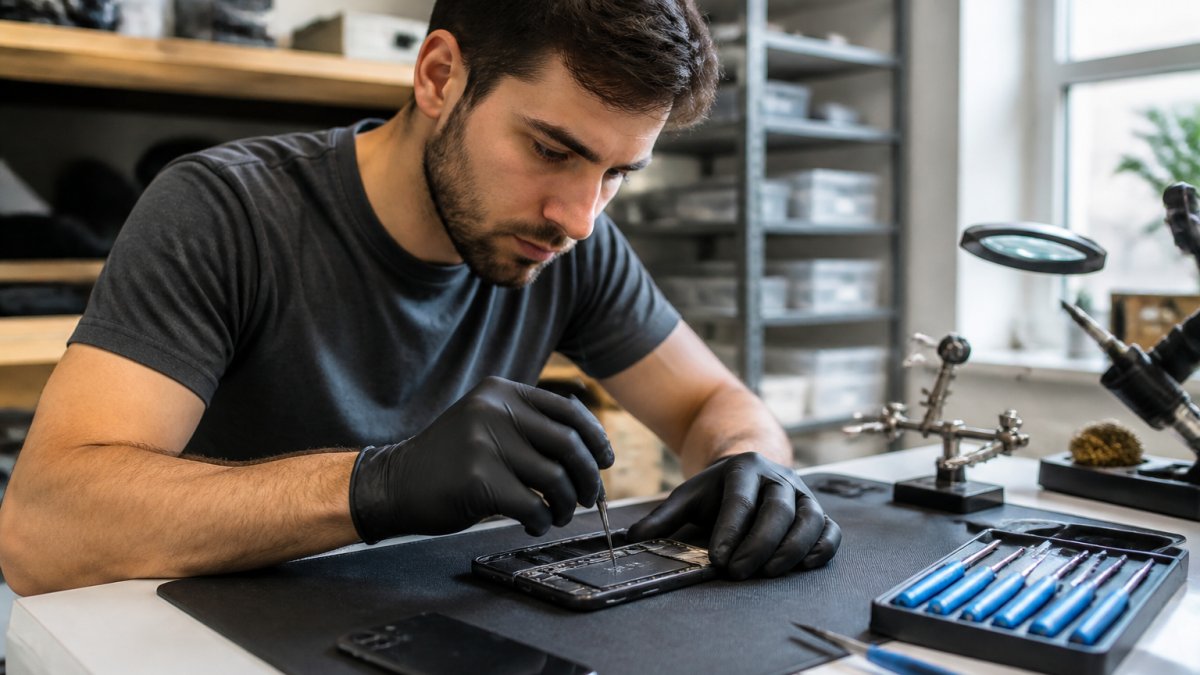
A real DIY repair needs more than a tiny screwdriver. You'll want a proper repair kit: precision drivers, a suction cup, plastic spudgers, tweezers, and often a heat pad to soften adhesive.

Most guides treat "phone repair" as one category. It isn't. A battery swap and a water-damage rescue are not the same project, and lumping them together is how people get in over their heads. Use this repair-specific breakdown before you buy a single tool.
Repair type | DIY difficulty | Key risk | Tools you actually need | Typical professional service cost |
Battery replacement | Moderate | Puncturing or bending the lithium-ion cell; adhesive is stubborn | Precision drivers, plastic pry tools, adhesive strips, heat pad | Often the cheapest shop repair; frequently bundled with a diagnostic |
Screen replacement | Moderate to hard | Cracking the new panel, tearing display flex cables, losing True Tone or auto-brightness calibration | Suction cup, picks, heat pad, adhesive gasket, model-specific panel | One of the pricier common repairs, driven mostly by panel cost |
Charging-port replacement | Hard | Ripping the port flex, damaging the charging circuit, solder work on some models | Drivers, spudgers, tweezers; soldering iron on soldered-port models | Mid-range, and often misdiagnosed as a port when the issue is the cable or lint |
Camera replacement | Moderate to hard | Damaging the camera module, breaking optical image stabilization, dust under the lens | Drivers, spudgers, tweezers, dust-free workspace | Varies widely by module; multi-camera assemblies cost more |
Water damage | Not recommended for DIY | Corrosion spreads after the device seems to work; hidden board-level damage | Ultrasonic cleaning and board-level diagnostics most owners don't own | Highest and least predictable; often quoted only after teardown |
A few patterns fall out of that table. Battery and screen jobs are the two most attempted DIY repairs because the parts are widely available and the steps are well documented.
Then there's parts compatibility. Not every replacement screen or battery works with every model, and cheap parts often fail early or disable features. Quality replacement parts cost more for a reason.
Key Takeaway Match the repair to your skill, not your confidence. Battery and screen swaps are the realistic DIY tier. Charging ports and cameras are borderline. Water damage belongs with a technician who has board-level tools.
Factor | DIY Phone Repair | Professional Service |
Upfront cost | Lower | Higher |
Total cost if it fails | Can exceed the device's value | Fixed by the quote |
Tools needed | Full repair kit | None |
Time investment | Hours, plus a learning curve | Drop-off and pickup |
Warranty | None | Repair guarantee |
Best for | Simple, low-risk jobs | Complex or high-value repairs |
How to Choose a Phone Repair Shop You Can Trust
Choosing a phone repair shop starts with three questions: do they diagnose before quoting, do they use quality parts, and do they stand behind the work? A trustworthy shop answers all three without hesitation.
Use this quick checklist before you hand over your device:
They give a written quote before starting
They explain what part they'll use and why
They offer a warranty on parts and labor
They tell you the turnaround time upfront
They're clear about data and backup before work begins
At PHONEPROBS, we quote before we touch the device and warranty our repairs.
Warranty, Water Resistance, and Parts Pairing: What DIY Void
DIY repairs void your manufacturer warranty, and that's just the start. Opening a phone usually destroys its water resistance because the factory seal is broken. Re-sealing at home rarely restores that protection, the original gasket is compressed to a specific tolerance, and a hand-applied adhesive strip won't match it. Even a shop reseal is a best-effort restoration, not a factory-grade guarantee.
Parts pairing makes it worse. Many modern phones tie components like screens and batteries to the device's software, so a self-installed part can trigger warnings or lose features.
Here's the part most comparisons leave out: the warranty question and the data question are the same decision. The moment you open the device or hand it to a shop, you need a current backup, and you need to think about who can see your data.
Before any repair, DIY or professional:
Back up to the cloud and to a computer if you can. A repair that goes wrong is survivable; a repair that goes wrong with no backup is not.
Know your passcode situation. Some repairs require the device to be unlocked for testing. If you won't share a passcode, ask how the shop will verify the repair.
Sign out of accounts you don't want accessible, or use a repair mode if your device offers one.
Ask where the device is stored and who has access during the repair.
What to ask a shop about warranty and parts:
Is the warranty on the part, the labor, or both, and how long does it run?
Are the parts OEM, OEM-equivalent, or aftermarket? Get it in writing.
Will the repair preserve water resistance, and do they reseal?
Will replacement components be calibrated or paired so features keep working?
What happens if the same fault returns, is the re-repair covered?
Watch Out A warranty that only covers the part and not the labor can still leave you paying twice. Ask for the terms in writing before you approve the repair.
Pro Tip If your device is still under a manufacturer warranty or an extended protection plan, check the terms before any third-party repair. Some plans require service through an authorized provider to keep coverage intact.
The practical takeaway: DIY saves money upfront but trades away warranty coverage, water resistance, and often feature calibration. Professional service costs more but usually restores all three, provided you pick a shop that will put its warranty and parts policy in writing.
Conclusion: Matching the Repair Method to Your Device and Situation
A cracked screen on an older budget phone might be a fine DIY candidate. A water-damaged flagship, a console that won't power on, or any device holding data you can't lose belongs with a professional. If you're unsure which camp you're in, the safe move is a free diagnosis.
Frequently Asked Questions
Is it cheaper to repair a phone yourself or hire a professional?
DIY repair kits and replacement parts often cost less upfront than professional service. A screen replacement kit might run $20 to $60, while a professional repair includes labor and typically costs more. But DIY costs add up when you factor in tools, potential damage from mistakes, and the risk of buying incompatible parts. If the repair fails, you may pay for both the failed attempt and the professional fix. For simple jobs like battery replacement on older phones, DIY can save money. For complex repairs or water damage, professional service usually costs less in the long run.
What are the risks of repairing a phone yourself?
The biggest DIY phone repair risks include damaging internal components like the display connector or logic board, puncturing the lithium-ion battery and causing a fire, and losing water resistance when the seal is broken. Many phones use adhesive that requires heat to remove, and prying in the wrong spot can crack the screen or tear flex cables. Without proper grounding, static electricity can fry sensitive chips. If you lack repair experience or the right phone repair tools, the risk of turning a minor issue into a dead device is high.
Can DIY phone repair void a warranty?
Yes. Opening your phone yourself almost always voids the manufacturer warranty. Many devices also use parts pairing, where replacement components must be calibrated to the phone's serial number. Aftermarket parts may trigger warning messages or disable features like True Tone or battery health reporting. If your phone is still under warranty or you have device protection through your carrier, a professional repair service is the safer choice to keep coverage intact.
When should I take my phone to a professional repair shop?
Take your phone to a professional when the repair involves water damage, a cracked back glass, charging port replacement, or any issue with the logic board. These repairs require specialized tools, diagnostic equipment, and experience to avoid further damage. If your device is under warranty, if you rely on it for work, or if you have never repaired a phone before, professional service is the practical choice. A repair technician can also diagnose problems you might misidentify, saving you from buying the wrong parts.
How do I choose a reliable phone repair service?
Look for a shop that offers a written warranty on parts and labor, provides an upfront quote before starting work, and has experience with your specific device model. Ask whether they use OEM or high-quality aftermarket parts and whether they test water resistance after resealing. A good repair shop will explain the diagnosis, show you the damaged components, and give you a realistic turnaround time. Local shops that handle phones, tablets, laptops, and consoles often have broader parts inventory and can address multiple devices in one visit.
Not sure whether your repair is a DIY job or a pro job? Bring it to PHONEPROBS for a quick, no-pressure quote. We repair phones, consoles, computers, and laptops, we specialize in water damage repair, and we back our work with a warranty. We also buy, sell, trade, and lease devices, so if a repair isn't worth it, we'll tell you straight. Book your repair with PHONEPROBS and get your device working again.
BOOK YOUR REPAIR

Comments